The Full Spectrum of Microsoft AI Development Tools: From No Code to Pro Code
This spectrum accommodates users of varying technical expertise, enabling everyone from business professionals to seasoned developers to create sophisticated AI solutions.

 In the rapidly evolving landscape of AI Microsoft provides a comprehensive suite of tools designed to democratize AI development.
This spectrum accommodates users of varying technical expertise, enabling everyone from business professionals to seasoned developers to create sophisticated AI solutions.
Organized by escalating complexity—No Code for absolute beginners, Low Code for those with minimal programming knowledge, Vibe Code for AI-assisted natural language development, and Pro Code for expert-level customization—Microsoft’s ecosystem ensures seamless progression and integration across levels.
Powered by Azure AI, Power Platform, and GitHub, these tools leverage generative AI, such as Copilot, to accelerate innovation while maintaining enterprise-grade security and scalability.
This approach not only reduces barriers to entry but also fosters collaboration between citizen developers and IT professionals, with AI acting as a bridge. For instance, solutions built in No Code can be extended with Pro Code elements, creating hybrid applications that scale effortlessly.
No Code: Empowering Non-Technical Users with Drag-and-Drop Simplicity
At the entry level, No Code tools allow users without any programming experience to build AI-powered applications through intuitive visual interfaces. These platforms focus on drag-and-drop functionality, pre-built templates, and AI-assisted guidance, making AI accessible to business users, analysts, and citizen developers.
Microsoft Copilot Studio exemplifies this category, enabling the creation of custom AI agents and copilots using a no-code environment. Users can design conversational bots, automate workflows, and integrate with enterprise data sources like Microsoft 365 or Dynamics 365 without writing a single line of code. Features include prebuilt connectors for over 1,200 applications, natural language topic creation, and built-in analytics for monitoring bot performance.
Power Pages, another No Code offering, allows for the rapid development of secure, AI-driven websites and portals. With templates for common scenarios like customer self-service or employee intranets, users can incorporate AI elements such as chatbots or recommendation engines via simple configurations. Power BI, for data visualization, rounds out this level by enabling no-code dashboards with AI insights, such as automated anomaly detection and natural language querying.
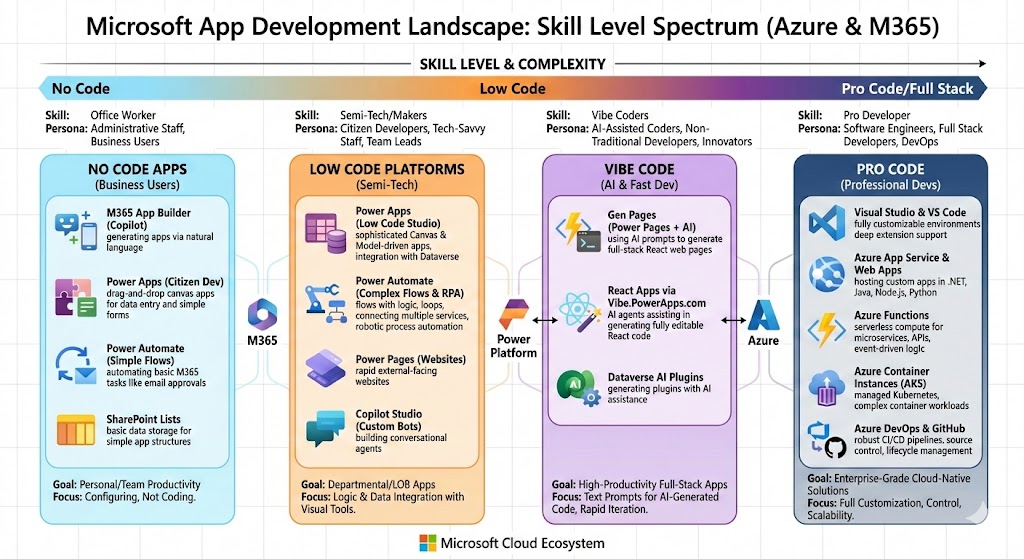
These tools are ideal for quick prototyping, with AI handling repetitive tasks like data mapping or UI design, allowing users to focus on business logic. Adoption has surged, with over 500 million monthly active users across Power Platform as of early 2026.
Low Code: Bridging Simplicity with Customization
Low Code tools introduce minimal coding elements, such as simple expressions or connectors, while retaining visual development paradigms. This level suits users with basic technical skills who need more flexibility than No Code provides, such as IT admins or power users.
Power Apps is the cornerstone here, offering a low-code platform for building canvas and model-driven apps. Users can create mobile or web applications using drag-and-drop components, formulas similar to Excel, and AI builders for features like form processing or object detection. Integration with Dataverse provides a secure data layer, while Copilot in Power Apps suggests layouts, data connections, and even generates entire apps from descriptions.
Power Automate enhances this with low-code automation, allowing users to build workflows that connect AI services, such as sentiment analysis or prediction models, across hundreds of apps. For example, a user might create a flow that triggers an AI-powered email response based on customer inquiries, using prebuilt actions and minimal custom logic.
In this tier, AI plays a pivotal role in accelerating development—tools like Express Design convert sketches or PDFs into functional apps, and generative AI in Power BI creates reports from natural language prompts. Low Code solutions have been recognized as leaders in Forrester reports, emphasizing their balance of speed and governance.
Vibe Code: Conversational AI-Driven Development
Vibe Code represents an innovative, AI-native approach where users describe their ideas in natural language—”vibing” out concepts—and AI generates the underlying code and structure. Coined by AI pioneer Andrej Karpathy, this method democratizes coding by turning conversations into executable applications, ideal for rapid ideation without deep technical expertise.
Microsoft’s Power Apps Vibe Experience (in preview as of January 2026) embodies this, allowing users to build complete apps by simply articulating business needs. The AI interprets prompts to create data models, logic, and UIs, with options for iterative refinement through chat. For instance, saying “Build an inventory tracker with AI predictions” could yield a fully functional app, including integrations with Azure AI services.
GitHub Copilot also supports Vibe Code workflows, where developers converse with the AI in VS Code to generate code snippets or entire features. This level excels in prototyping, addressing the “blank page problem” by providing instant, context-aware suggestions, and is particularly useful for non-technical users experimenting with AI agents.
Pro Code: Advanced Tools for Expert Developers
At the highest complexity, Pro Code tools cater to professional developers requiring full control over code, architecture, and deployment. These leverage traditional programming languages with AI enhancements for efficiency.
Azure AI Studio serves as the hub, offering a code-first environment for building, fine-tuning, and deploying models using Python, .NET, or other languages. Developers can access foundation models from OpenAI or Microsoft’s MAI series, integrate with Semantic Kernel for orchestration, and use ML.NET for embedding AI in applications.
GitHub Copilot and Visual Studio Code provide AI-powered code completion, debugging, and refactoring, boosting productivity by up to 55% according to studies. For complex scenarios, Azure Machine Learning enables end-to-end pipelines, including data prep with Fabric, model training on GPU clusters, and monitoring with Prometheus.
Pro Code integrates seamlessly with lower levels; for example, a No Code bot from Copilot Studio can be extended with custom Pro Code plugins. Tools like Azure Bot Service support hybrid development, blending low-code interfaces with pro-code extensibility.
| Level | Key Tools | Ideal Users | Core Features | Use Cases |
|---|---|---|---|---|
| No Code | Copilot Studio, Power Pages, Power BI | Business users, analysts | Drag-and-drop, templates, AI insights | Chatbots, websites, dashboards |
| Low Code | Power Apps, Power Automate | Power users, IT admins | Visual builders, formulas, connectors | Custom apps, workflows |
| Vibe Code | Power Apps Vibe, GitHub Copilot Chat | Idea-driven creators | Natural language prompts, AI generation | Prototyping, conversational apps |
| Pro Code | Azure AI Studio, VS Code, ML.NET | Developers, data scientists | Full coding, model fine-tuning, APIs | Enterprise AI models, integrations |
Conclusion: A Unified Ecosystem for AI Innovation
Microsoft’s AI development tools form a cohesive spectrum, allowing users to start at their comfort level and scale as needed. This escalation from No Code to Pro Code, with Vibe Code as an innovative bridge, ensures that AI is not just for experts but for everyone. By infusing AI across all layers—via Copilot and generative capabilities—Microsoft reports up to 3.5x faster development cycles and broader adoption, positioning organizations to thrive in an AI-first world. Whether automating routine tasks or building frontier models, this ecosystem drives efficiency, creativity, and responsible AI deployment.